7 ways to use AI to understand legacy code
⛑️️ My First Aid Kit can help you rescue any codebase quickly and safely!
You open a file you need to change: 1232 lines. None of your colleagues wrote it. The person who did left two years ago… or maybe an agent generated it last sprint and it never really got reviewed as everyone is buried under the amount of generated code.
Either way, you don’t understand it, but you still need to change it.
That’s legacy code.
I defined it as the code you need to change, but you struggle to understand. Thus, I smiled when I watched Michael Feathers’ talk at Craft 2026. The author of Working Effectively with Legacy Code now frames legacy code as the difference between code we understand and code we don’t.
The talk is cleverly called “Working Effectively with AI-Generated Code”. In fact, it applies to any code you don’t understand, whoever wrote it. AI is just another way to produce such code, at a faster rate.
In this talk, Feathers shares hope: while AI is used to generate more and more legacy code, it can also be leveraged to keep up and help you understand such code. Here are the tips that I found the most useful, with concrete “prompts” you can feed your favorite LLM to try them out 🙂
Why do you struggle more with AI-generated code?
Feathers starts with Peter Naur’s “Programming as Theory Building” (at 6:55), a paper from 1985 that is a very relevant read today.
Naur’s idea is the following:
- a program is the theory the developers have in their heads
- the code on disk is a by-product
- when the people who hold the theory leave, the theory leaves with them. The next developers have to rebuild it from the source, the tests, and the stories they hear about the old system.
That’s why inheriting a codebase hurts so much 😅
Now think about code that an agent generated: nobody had a theory of it in the first place! You get all the by-product (code), and no person to ask later about it once the context is gone. Also, it keeps coming faster than you can review it.
So, should we stop using AI to write code? 🤨
That’s not the point of the talk. Feathers’ point is that AI also gives you new ways to build that theory. For instance, you can ask it to explain things. But there are better ways to do so than just asking “explain this code”.
The 7 tips
1. Lensing: ask for “the 5”, then “the 3”
“What does this function do?” is a fine question. But the quality of the answer depends on the model, its effort level, the skills you have…
Instead, Feathers asks for a specific number:
List the 5 most important responsibilities of `processOrder()`.Then, follow up with:
Now list the 3 most important responsibilities of `processOrder()`.The second answer won’t be the first one minus two items. The model has to regroup things to fit in 3. So 2 responsibilities get merged under a new name.
That’s where you learn: comparing “the 5” and “the 3” shows you how the code could be split, and which names might fit the pieces.
You can use the same trick on files, instead of functions. Pick a handful of files and ask what they do together:
Look at these files together. What do they do?
Are they related enough to share a name? Which one?
Then, add or remove a couple of files and ask again. Watch how the answer moves. It may hint at other ways the code could be grouped into modules.
Feathers gives an example of that: pick some files of an existing service and ask “if the service only contained these files, what would you call it?”. If the name you get back is very different from the service’s name, maybe that group of files wants to be its own module, with a name that fits better 💡
2. Project the code into another shape
Feathers calls these projections. The idea is simple, yet powerful: render the same code in a format that makes something else visible.
If you have ever fiddled with a piece of paper or a whiteboard to reason about the code you are reading, well, this is a similar idea.
Yet, this is not something your LLM will produce by default, so you have to ask.
A few projections you can try:
-
A state diagram. Feathers used PlantUML. I like to go for Mermaid since GitHub renders it (so you can append it to a PR, if relevant).
Draw a Mermaid state diagram for the `Subscription` class. Which states does it have? What triggers each transition? -
Math. Feathers took a two-page Ruby class and asked for its mathematical representation, rendered as LaTeX. The result made the logic click for him.
-
Another language or paradigm. Convert it to Haskell. Or, if the code is functional, ask what it would look like with objects. The goal is not to ship that version, it’s just another way to look at the problem so you understand it better.
Projections also help when others need to understand something. Recently, I asked Claude to turn a change we were planning on our volume snapshots into a diagram, so my colleagues could review the change more easily:
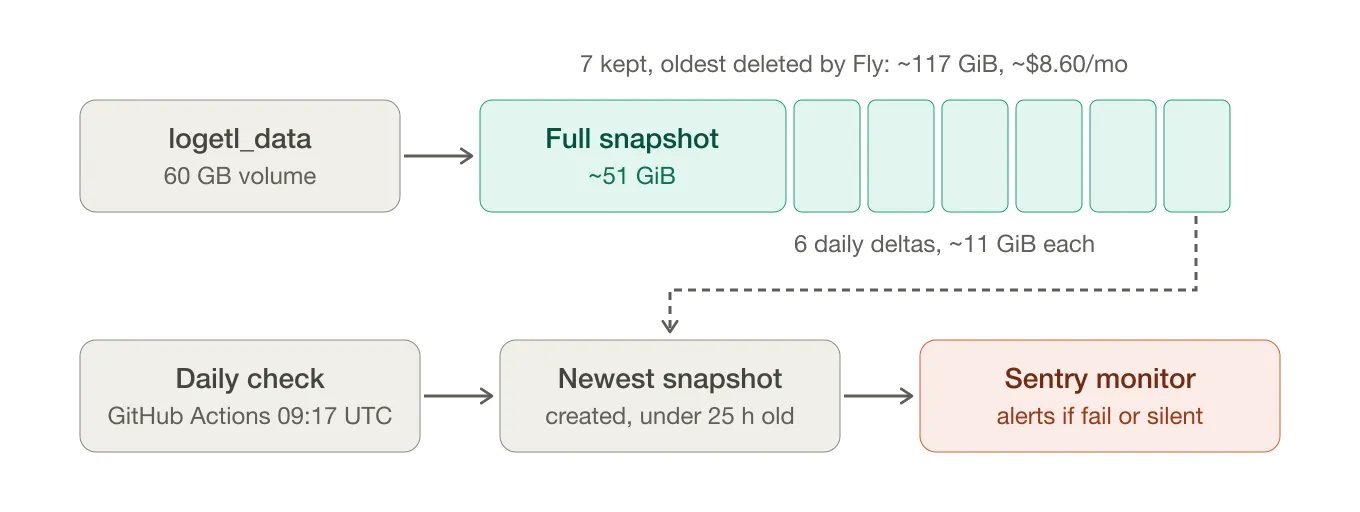
It isn’t perfect (e.g., why is the “Sentry monitor” node red?). But it was fast to produce, and good enough for reviewers to get the point without facing the typical wall of AI-slop text.
Before AI, I would rarely have drawn a whole diagram just for that. Now, it’s one prompt away. Yet, you still need to make that prompt.
If a piece of the projection confuses you, zoom in on that piece with lensing. The techniques combine well.
3. Go rogue, ask for silly features
Feathers compares this to wondering what would happen if you fed marshmallows to a puppy. Of course you wouldn’t try it on the puppy (!). But AI gives you a sandbox to try it on your code.
What would change in this module if we had to support
multiple currencies on a single invoice?
Ask for features that go against the grain of the current design. Some will fit in a couple of lines. Others will touch 12 files. Like Exploratory Refactoring, the agent doesn’t need to get it right for you to learn: you see where the design bends easily, and where it resists.
Feathers comes back to this idea later in the talk as a way to “bulletproof” a design.
I see it as a relatively cheap way to find out which parts of the system you’ll want to refactor before the next real feature lands there.
4. Ask twice, or ask “for N”
AI always sounds confident, which is a problem when you are not familiar with the code.
To work around that, Feathers asks the same question in a fresh session, with no shared memory, and compares the answers. Are both right? Is one wrong? Did one notice something the other missed?
Asking twice allows you to make a direct comparison. But you can go further and ask for N:
Give me 5 different ways to explain what `syncInventory()` does,
each from a different angle: data flow, error handling,
side effects, performance, business rules.
Or run several agents on the same question, in parallel. It costs you a few minutes. You can then task another agent to check all answers to draw the comparison and have a clearer picture—some sort of “meta-analysis” if you will.
5. Ask what’s unnecessary
This one is simple and I think underrated:
What in this code is unnecessary?Or one of my favorites:
Are there any tautological tests in this file? Redundant ones?LLMs are really good at generating content, adding more code, adding tests…
Feathers noticed the answers go further than a linter would to detect dead code. The AI may point out that a library already handles this. Or that something upstream already validates that input, so the check/test is indeed redundant.
⚠️ Don’t delete anything just because AI said so, of course. Treat the answer as a list of hypotheses to verify.
Again, when the code is untested, Exploratory Refactoring is a nice way to check them without risk: refactor, learn, then throw away the changes.
6. Build a tiny system from what you learned
As you learn facts about the system, write them down.
Then, ask the AI to build a tiny system that does only these things. For instance:
Here is what I know about our billing system:
- Invoices are generated on the 1st of each month
- Late payments get a 5% fee after 15 days
- Customers can pause their subscription for up to 3 months

Write the smallest program that does exactly this.
Then, compare that tiny program with the real thing.
Where does all the extra complexity come from? Some of it will be legitimate, edge cases you didn’t know about. Some of it won’t. Sometimes you’ll find the simple core that was hiding in the mess. That’s a great target for your next refactoring!
7. Have the AI quiz you before you ship
This is the one I’ve started experimenting with after watching this talk.
“Co-Authored-By: Claude” is the new “Sent from my iPhone”. This is misleading marketing though: regardless of the tools you use, you are the one who owns the changes.
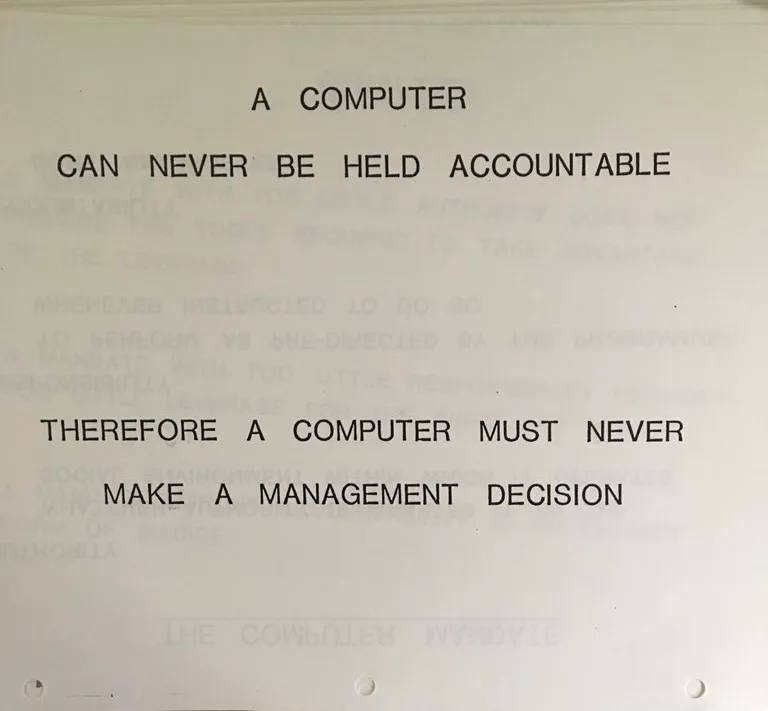 (Source: IBM training slide, 1979)
So you’d better understand it. Not in detail, but at least understand what the change does, the theory. It shouldn’t make you a bottleneck. Think of it as a sanity check.
Feathers flips the roles: he asks the AI to quiz him on the code it just wrote.
Before we push code, ask me 5 questions about it,
one at a time, to check I understand it well enough.
Focus on edge cases and what could break.
You can change the focus: security, performance, the patterns used… As Feathers says, there’s no guarantee these are the right questions. But it’s a lot more approachable than reading the whole diff from A to Z, hoping to notice what matters.
IMO, it works on legacy code in general. Ask the AI to quiz you on a module before you touch it. It helps you get into thinking mode and the corrections from the LLM will teach you before you start changing it.
Try first, then ask
Feathers worries about de-skilling, which is a recurring, legitimate concern whenever new technology changes the way we used to do things.
His answer: when he wants to understand something, he tries on his own first. He looks for hints, compares with systems he’s seen before. When he gets stuck, he asks AI. Then he compares: what was I missing? Or what did the AI miss?
The active thinking is what makes the knowledge stick. You don’t need to do it for everything. Pick the parts of the system that matter for your work and your career, and do the homework there.
He closes with Lisanne Bainbridge’s paper, “Ironies of Automation” (at 43:54). Back in 1983, Bainbridge noticed that the more you automate, the more skilled the humans in the loop need to be. Automation takes care of the routine work. Humans get called in when something goes wrong. The irony is that these are the hardest cases to solve!
If you didn’t keep your agents in check and they painted themselves into a corner, you are the one who needs to understand what’s going on and unblock the system, so you can keep shipping without breaking everything all the time.
Ask better questions
I like that none of these techniques ask you to trust the AI blindly. They all generate more views of the code: different scales, different shapes, different answers to compare. Understanding comes from that comparison.
Also, none of them are specific to AI-generated code. They work as well on that 15-year-old module nobody dares to touch. It’s just that AI generates more of these, faster.
If you only try one, I’d start with quizzes before you ship. As you let the LLM handle the implementation and generate code as a by-product, I find it really relevant to help you keep your hands on the wheel. See what you learn 😉
Have you tried some of these already? Do you have other prompts that help you understand legacy code? I’d love to hear about them: hit me on Bluesky or LinkedIn.

Written by Nicolas Carlo
who lives and works in Montreal, Canada 🍁
He founded the Software Crafters Montreal
community which cares about building maintainable softwares.
Similar articles that will help you…

Dive into an unfamiliar codebase from its edges
Do you feel paralyzed, wondering how to approach a legacy codebase? Try to start from the system edges.
Testability, Empathy, and Safe Refactorings
4 great talks on Legacy Code that I had the pleasure to host. This edition particularly focuses on testing and refactoring.
Refactoring, Unit Tests, and Symmathesy
5 great talks on Legacy Code that I had the pleasure to host. Learn how to progressively migrate existing codebase towards a better state.

Can AI help me refactor legacy code?
Can assistants like ChatGPT refactor existing code without introducing bugs? Let's figure it out with an actual codebase.